Your relief work comes home.
Whether you have an LLC with lots of direct bookings, or just pick up a few shifts a month on an app, your relief work is scattered across emails, text, marketplace apps, spreadsheets, and a shoebox of 1099s. Roost turns all of it into one calendar, one invoice trail, and one picture you own outright. And your practices get a portal to schedule and pay you. Start for free until your relief work earns $25K a year. After, a year of Roost costs less than a single shift.
You own your data, not Roost. Export everything, anytime.
Your relief work lives in eight places. None made for you.
Every gap costs real money: uncaptured mileage, missed deductions, chased invoices, a tax season spent reconstructing the year. Roost puts it back together.
The operating system for your relief work
Every shift, wherever it came from
Independent bookings and marketplace shifts, side by side. One calendar, one invoice trail, one picture of what you’ve earned. You don’t change how you work. Roost adapts to you.
Bill it, bank it, don’t chase it
The invoice builds itself from the shift you worked, and the reminders go out without you writing them. Opt to take payment through Roost and the money lands in your account already matched to the shift. Or keep getting paid the way you do now. Either way, collecting stops being the extra job.
Own what you built
Your practices, your rates, your history: always exportable, never held hostage. No non‑competes, no lock‑in on the relationships you built. Roost is the operating system you invest in for your relief work, not a middleman you work for.
Getting paid is the last unpaid job
You worked the shift, built the invoice, sent it, and now you wait. The check comes when the practice gets to it (unless you remind them). Then you photograph it or drive it to the bank, and wait again for it to clear. Roost Payments takes each of those steps off your plate, and makes it easy for the practice, too.
- The chaseThe invoice, then the reminder, then the awkward follow‑up.Roost sends the invoice and the reminders, and the practice pays online.
- The depositPhotograph the check, or drive it in, then wait days for it to clear.Bank transfer or card, straight to your account. No check to deposit.
- The matchThen work out which payment covered which shift.With Roost Payments, each payment matches itself to its invoice and shift.
Some show up on bank statements, others in the form of time, energy, or anxiety. If you choose to use Roost Payments within a paid Roost plan, a $1,000 shift paid by bank transfer costs $10 or less. The invoice Roost already built gets paid, the money lands in your account, and it matches itself to the shift.
You’re still the one being paid. The sale is yours, the funds are yours the moment they settle, and the payment runs through Stripe, between you and the practice. In the $10 example above, Stripe gets $5 for processing and Roost keeps the rest. Optional card payments cost more (about 3.4% in the example above). Fees for Roost Payments vary by plan.
Optional on every plan and separate from your subscription, always. Keep getting paid however you do today and Roost still builds the invoice, sends the reminders, and keeps the record.
What changes when a practice books you directly
Marketplaces can be a good way to find new practices, and their share pays for that work. Instead, working directly with practices has benefits for everyone involved, and Roost handles the scheduling, invoicing, and collecting the marketplace would otherwise be doing for you.
Through a marketplace
| The practice pays | $1,440 |
| The marketplace’s share (16.7%) | $240 |
| You receive | $1,200 |
Booked directly with the practice
| The practice pays | $1,320 |
| Getting paid via bank transfer through Roost Payments | about $12 |
| You receive | about $1,308 |
The practice pays $120 less. You keep about $108 more.
An example, not a quote. Your rates will differ, but the arithmetic works the same way. Fees for Roost Payments vary by plan.
Whether you book all direct, all marketplace, or a mix of both, Roost keeps everything in the same picture.
Doing it by hand isn’t free either
The phone tag. The “what dates work for you?” threads. The invoice you built in Word and had to resend twice. The mileage log that never quite matches the shifts. None of it gets billed at your hourly rate. It just leaks. Put numbers on the leaks and the math comes up short.
| Scheduling by text & phone tag“what dates work for you?” threads, across every practice, ~2 hrs a month | 24 hrs |
| One shift lost to a calendar mix‑upa double‑booking, a wrong date, a thread that just died | −$1,200 |
| Invoicing & chasing paymentbuilding, sending, resending, following up, ~2 hrs a month | 24 hrs |
| Undeducted mileage~100 missed miles between practices each month, at the 76¢ IRS rate, assuming a 25% tax rate. | −$228 |
| Gone each year, plus ~48 hours of your time | −$1,428 |
Your numbers will differ. That’s the point. Count your own phone‑tag hours and missed miles for one month and do the same math.
A full year of Roost starts at $499, well under what a single relief shift grosses. Save one shift from a by‑hand calendar mix‑up or double‑booking and Roost has paid for itself. If you gross below $25K a year, Roost costs nothing at all.
Six full working days of phone tag, calendar juggling, and invoice chasing. If your month looks like this one, that’s time spent on your own back office. Practices requesting shifts off your real availability, invoices built from worked shifts, reminders that send themselves: that’s where those hours come back.
The unglamorous things, done right
The parts of running relief work as a business that eat your time, handled the way a good bookkeeper would.
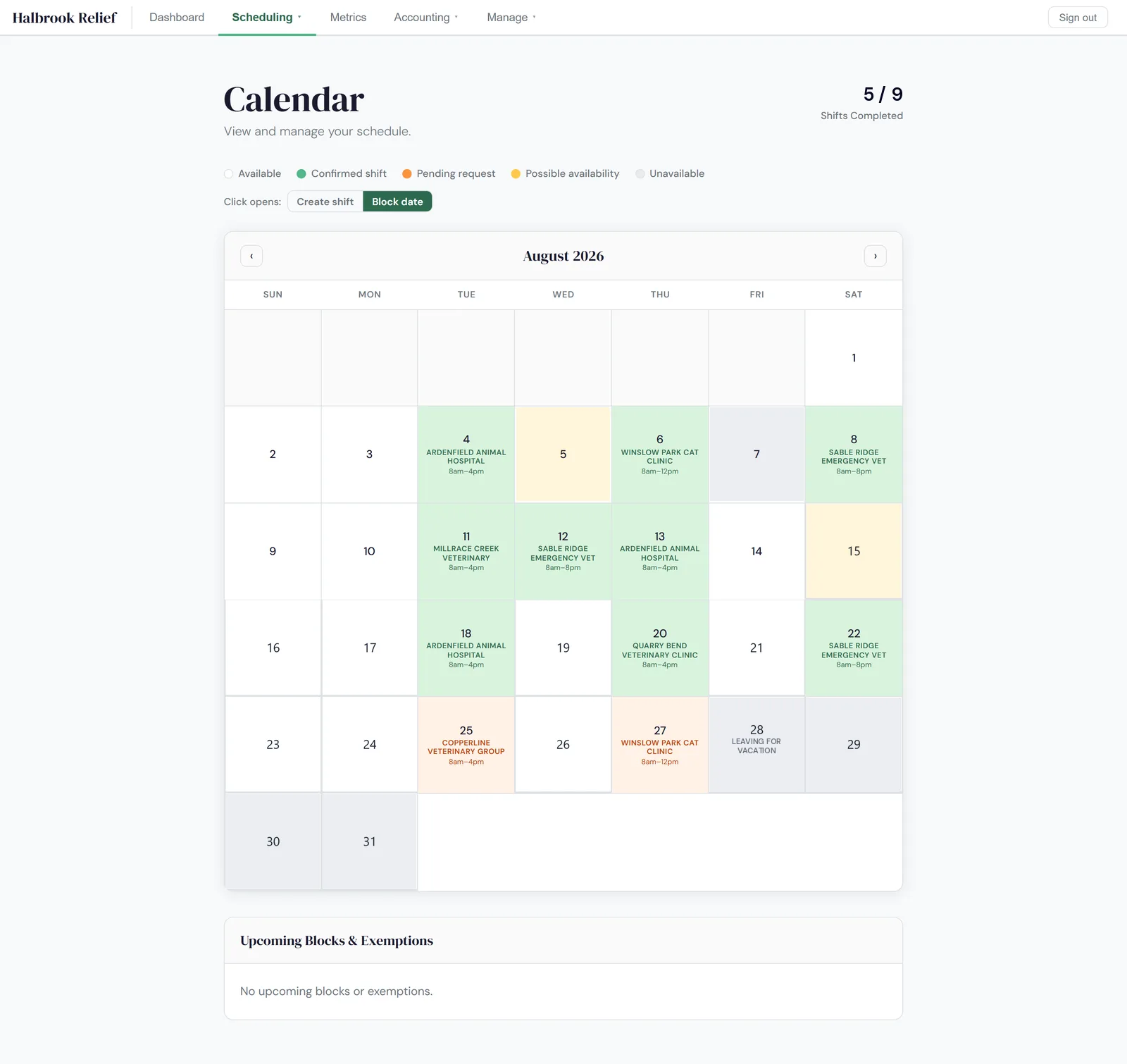
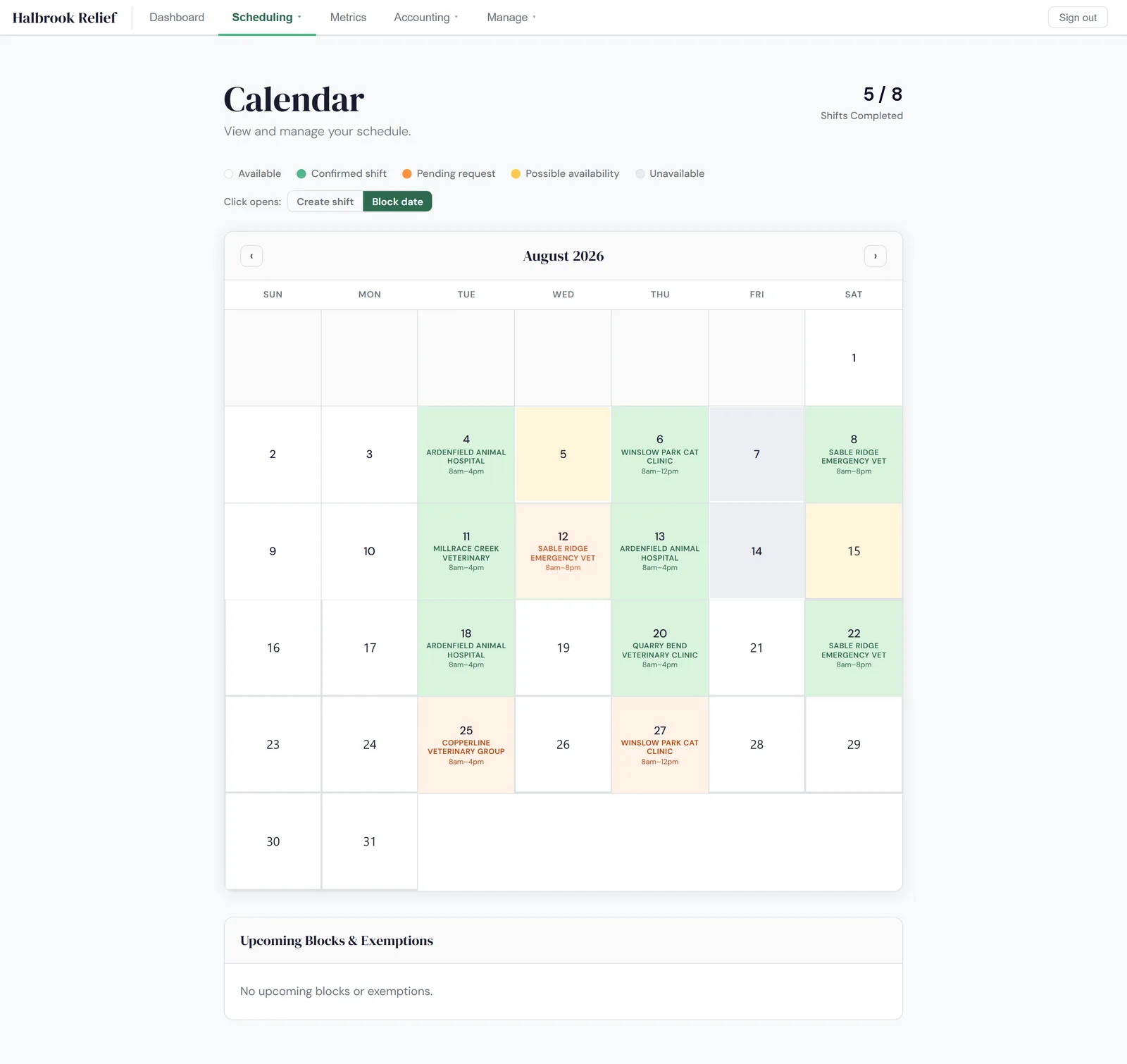
A schedule that works your way
- View marketplace shifts alongside the practices you book directly
- Syncs to Google, Outlook, or Apple Calendar automatically
- “Possible” days, not just booked‑or‑blocked
- Have a “regular”? Batches of shifts, added in one step
- Add notes to any date, and choose day by day which ones practices see
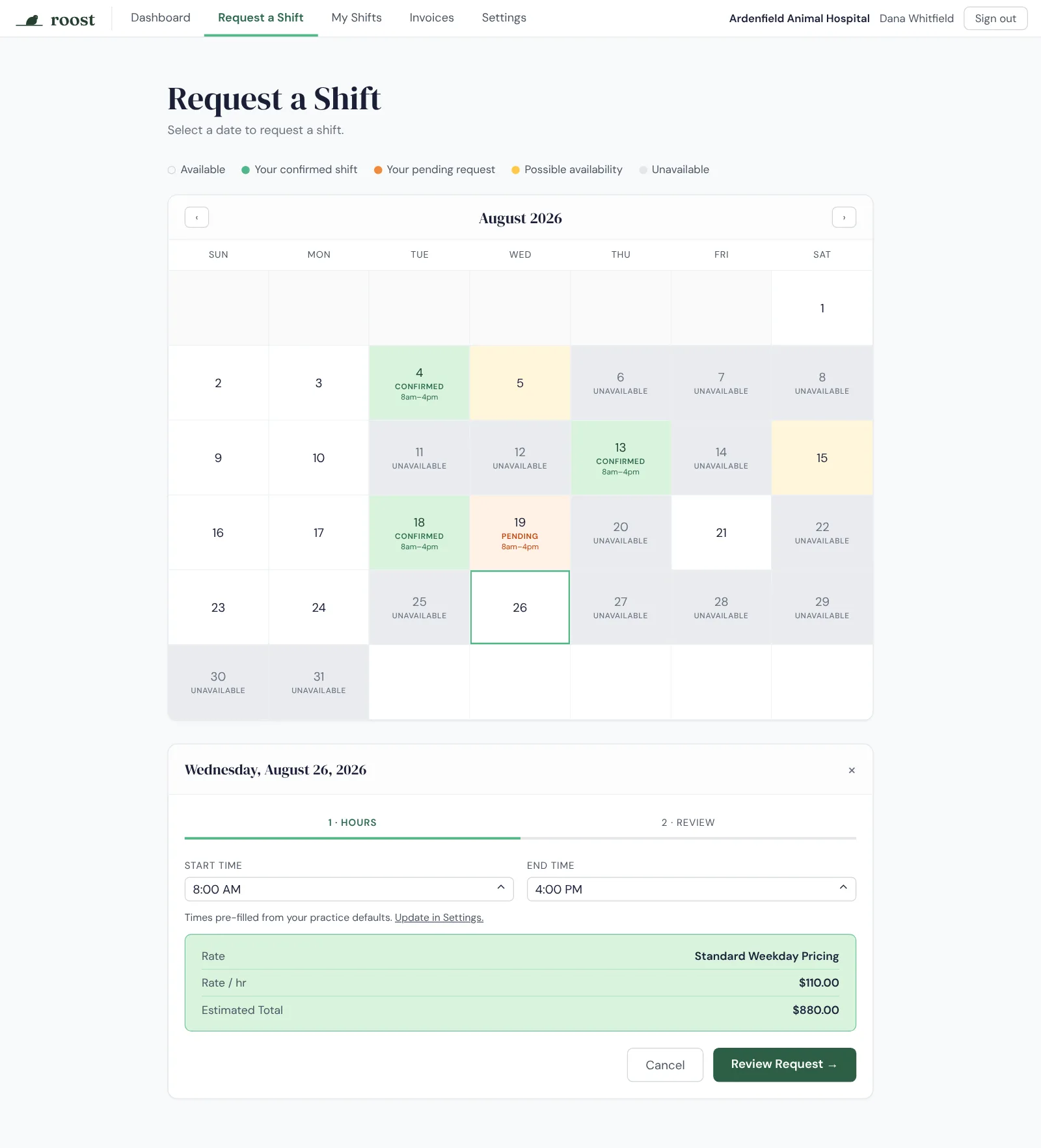
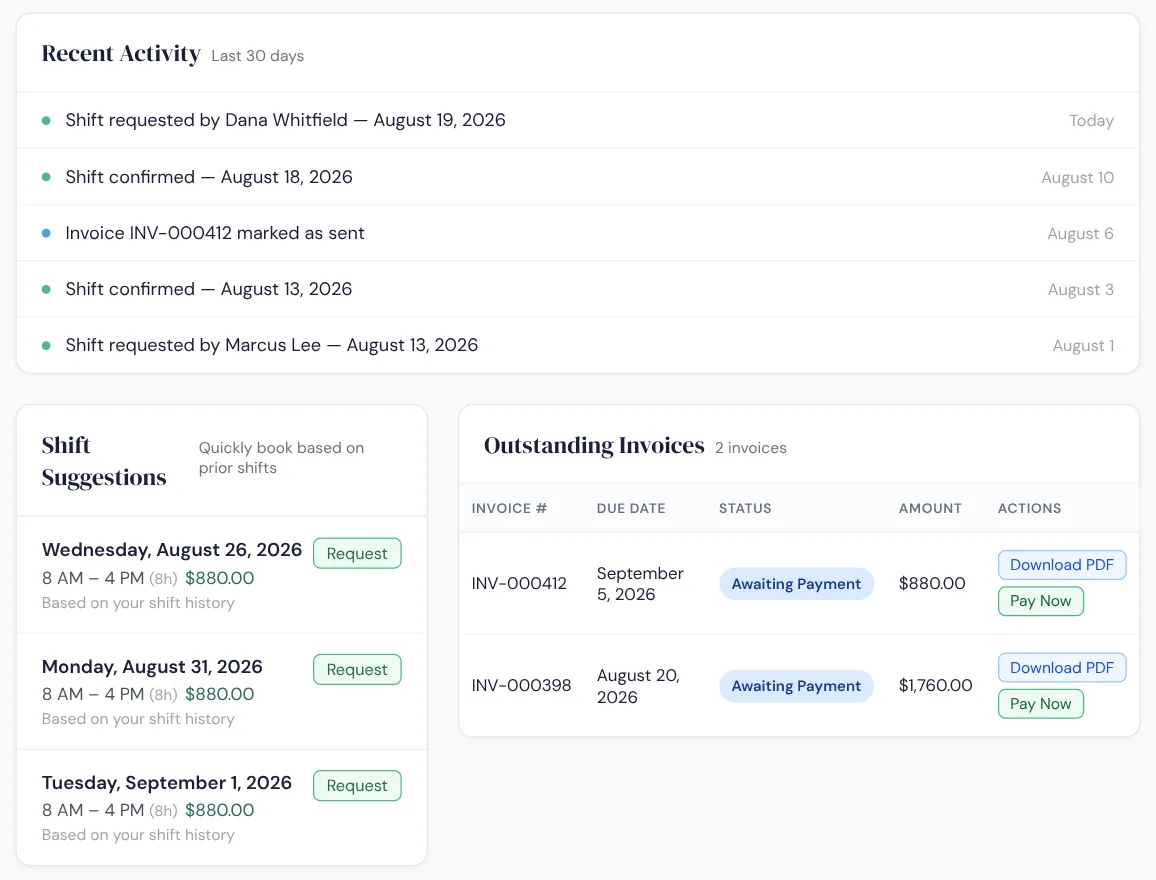
Give your practices a portal
- Each practice you work with requests shifts from only the availability you choose to show it
- Shift limits let you control your workload
- Automatic shift suggestions, tailored to each practice
- Upcoming shifts, invoices, and payment, all in one place
- Free for your practices to use
- Your branding throughout
- Coming soon: Your own domain
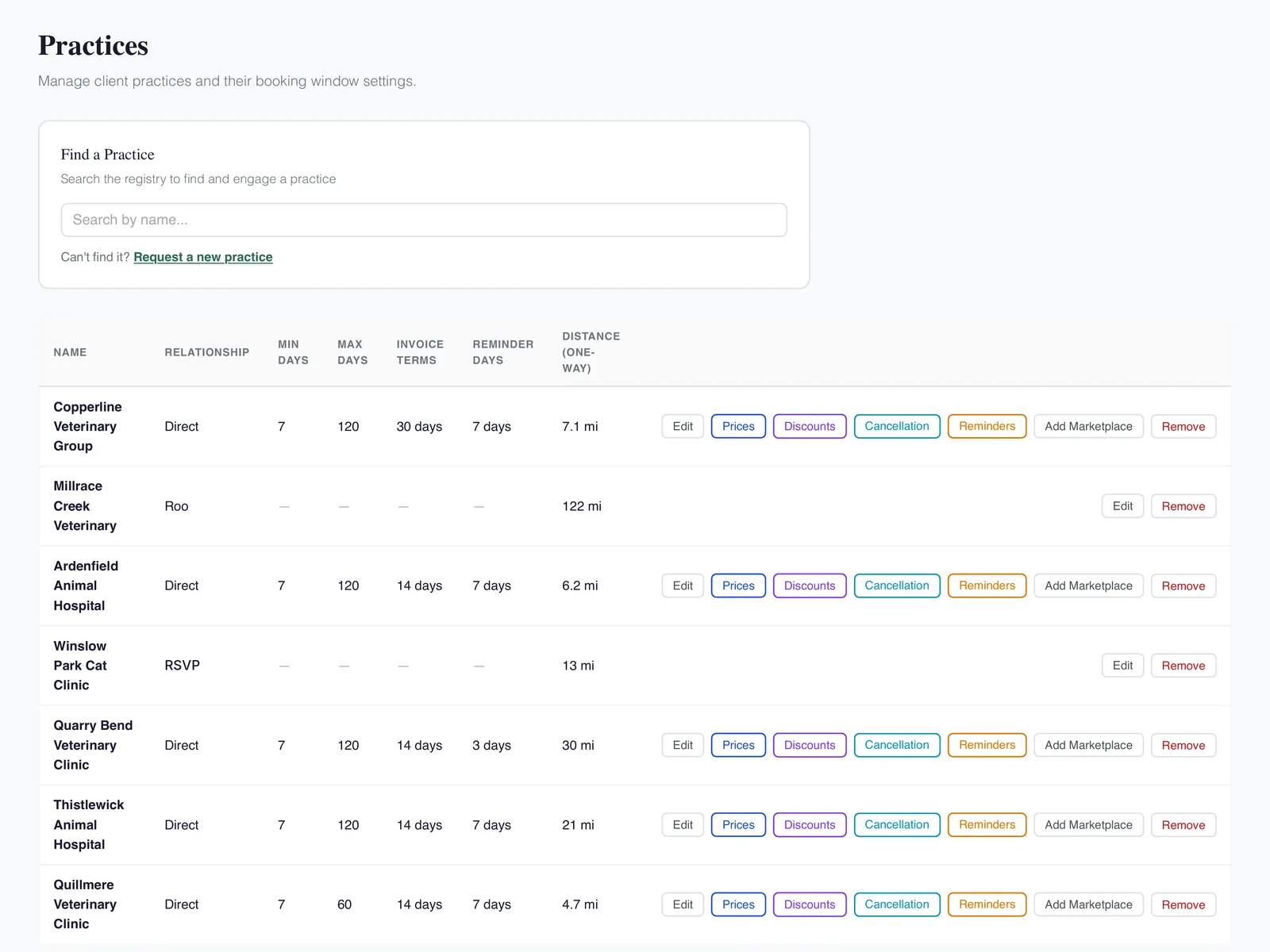
Your rates, per practice
- Each practice can have custom rate policies, or just use your defaults
- Your discount & cancellation policies, per practice
- Customizable holidays that follow the calendar, Black Friday included
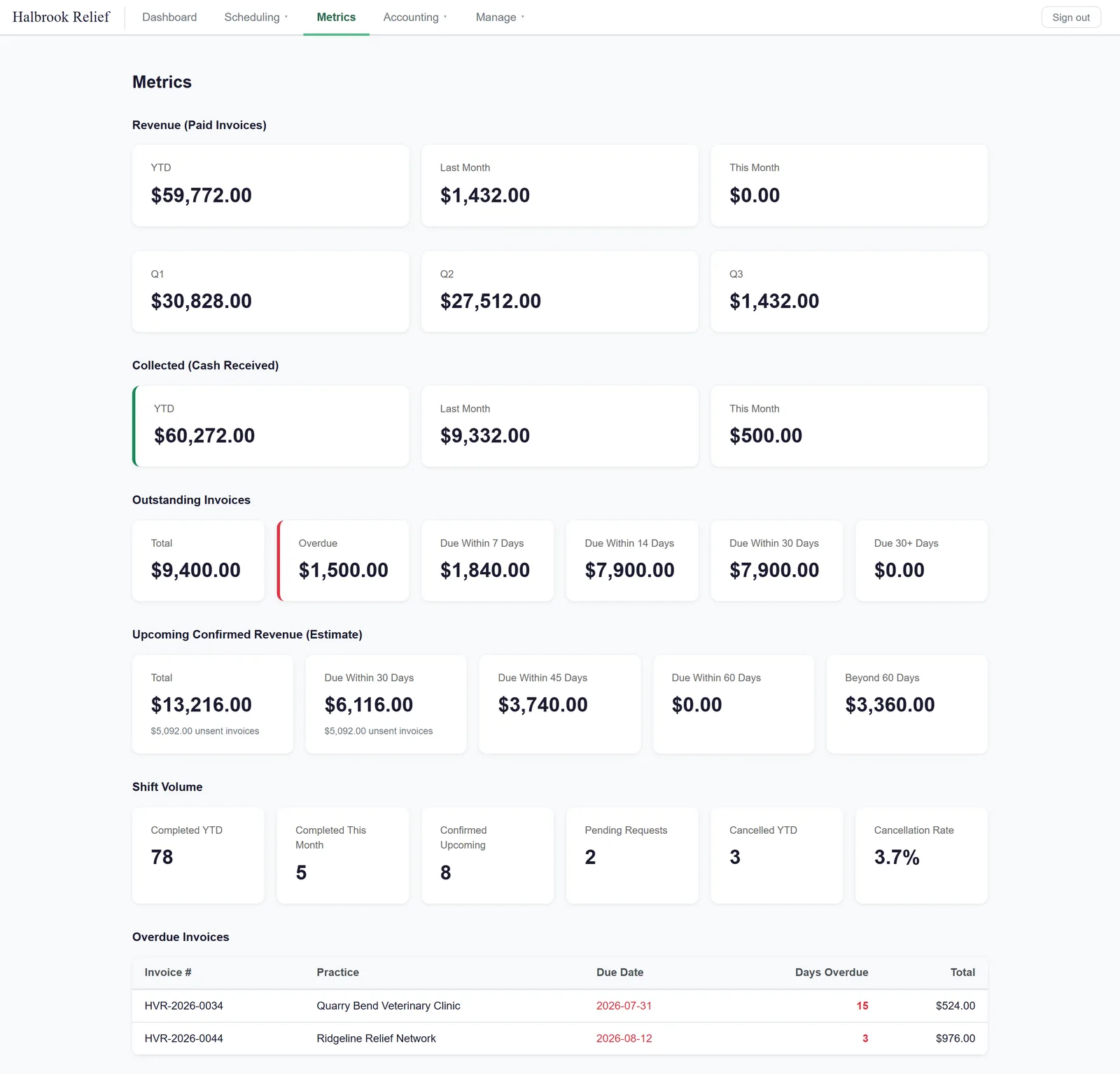
Know your numbers
- Revenue and cash collected, side by side
- What’s outstanding, and how overdue
- Confirmed income still to come
- Shifts worked, cancelled, and your cancellation rate
- Your whole year in one picture, with no April reconstruction
Invoices that collect themselves
- Invoices automatically built from worked shifts
- Email reminders, sent politely for you at the intervals you select
- Get paid by bank transfer or card, straight to your account
- Roost Payments matched to invoices automatically
- Coming soon: Accounting & banking integrations
Mileage, expenses & books
- Mileage logged against every shift
- Expenses captured as they happen
- Coming soon: Full bookkeeping tools: P&L, reports, reconciliation
You own your data and relationships
- Export everything: practices, shifts, invoices, history
- Works on day one and day one thousand
- No non‑competes, no lock‑in on the relationships you built
The Plans: Perch, Nest, Aerie
Start free. Pay when your relief work outgrows it. Every plan works with as many practices as you do, and the Roost Payments rate steps down as your plan goes up.
Perch
Every shift, every practice, and every mile in one picture, free while you’re getting established.
- Direct and marketplace shifts on one calendar
- Invoices built from worked shifts, with reminders
- A branded portal where your practices request shifts and pay invoices
- Automatic shift suggestions, tailored to each practice
- Your default rates, discount & cancellation policies
- Mileage & expenses, logged against your shifts
- Your numbers at a glance, plus a feed to Google, Outlook, or Apple Calendar
- Roost Payments, matched to invoices automatically
- Full data export, always
Nest
Everything in Perch, plus custom rates and policies you set practice by practice.
- Everything in Perch
- Custom rate policies for each practice
- Discount & cancellation policies, per practice
- Control what availability each practice sees
- Half the Roost Payments rate of Perch
Aerie
Everything in Nest, plus the books and integrations to keep things in sync.
- Everything in Nest
- Full bookkeeping tools: P&L, reports, reconciliation
- Accounting & banking integrations
- Every payment matched automatically, not just Roost Payments
- Half the Roost Payments rate of Nest, and a quarter of Perch
- Your own domain
Not sure which plan fits? Book a demo and we’ll walk through it with you.
Getting paid, as its own thing
Optional on every plan. When you use Roost Payments, your practices pay the invoice Roost already built online, the money lands in your account, and the payment matches itself to the shift without you reconciling anything.
- Perch
- 1%
- Nest
- 0.5%
- Aerie
- 0.25%
These rates are for Roost Payments. Stripe’s processing fee applies on top: 0.8% capped at $5 for a bank transfer, 2.9% + 30¢ for a card.
As an example, on a $1,000 shift paid by bank transfer: $5 to Stripe, plus $10 to Roost on Perch, $5 on Nest, or $2.50 on Aerie. That’s $15, $10, or $7.50 all in.
The payment is directly between you and the practice. You’re the merchant of record, so the money is yours the moment it settles. A disputed or returned payment is yours too.
Roost Payments is separate from your subscription and has its own published rates. We’ll give notice before any change.
Asked plainly, answered plainly
Do you take a percentage of my rate?
I mostly pick up shifts on an app. Is this for me?
Do I have to take payments through Roost?
When do I start paying?
What does it cost my practices?
Will someone help me set it up?
Is there a limit on how many practices I can work with?
Do I have to stop using marketplace apps?
What if I want to leave?
Do I still need separate bookkeeping software?
Every other tool in this job was made for someone else. Roost was made for you.